

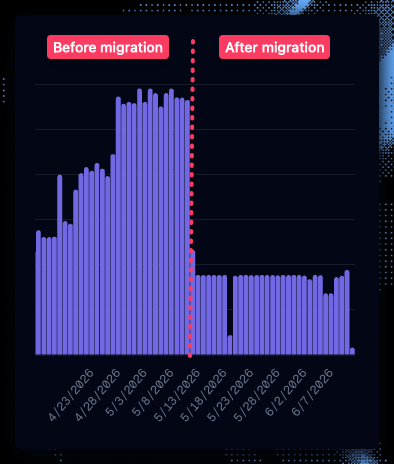
Dagster Cloud Serverless credits usage showing a significant cost reduction after optimizing dbt assets
Our take
At Narev, we build a Full-Stack AI FinOps Ecosystem, so we spend a lot of time thinking about the cost of running infrastructure. We do like the convenience of Dagster, but our 24/7 schedule quickly drove up our bill. It actually became more expensive to run Dagster than to run a self-hosted Airflow. But before committing to a new orchestrator, we wanted to understand any quick wins we could get by optimizing our Dagster setup.We found the biggest savings in the DBT (data build tool) assets
When we looked at our own Dagster usage, the expensive part wasn’t dbt itself. It was the way the officialdagster-dbt integration maps dbt nodes into Dagster assets.
The standard pattern uses @dbt_assets, which maps dbt models, and in some setups seeds, snapshots, or sources, into many Dagster graph nodes. That’s useful if you need model-level lineage in the Dagster UI.
But with the new pricing, each asset materialization has an orchestration cost ($0.035 to $0.040 per credit, plus compute time).
When you have hundreds of dbt models running hourly across partitions, you will end up paying Dagster to coordinate a graph that dbt already understands.
We fixed our setup by collapsing the entire dbt project into one Dagster asset. Same dbt logic. Same data. Far fewer orchestration steps.
The problem: @dbt_assets multiplies your bill
Here is what we started with: the standard pattern from the Dagster dbt integration docs:
@dbt_assetsregisters many Dagster graph nodes from your dbt project: Models, and in some setups seeds, snapshots, or sources, expand into Dagster assets. We had hundreds of warehouse views, which meant hundreds of assets in the Dagster graph running hourly..stream()withcontext=contextemits per-model materialization events: Dagster records each dbt model as a separate materialization, even though dbt runs them in a single CLI invocation.
The fix: One asset, one command, one materialization
We replaced@dbt_assets with a plain @asset that shells out to dbt:
The gotcha: context=context defeats the whole point
Our first version of the single-asset approach still passed context to the CLI:
Wiring it into jobs and downstream assets
Your job selection simplifies too. Before, we targeted a specific multi-asset definition:ETL: Before and after
The trade-offs
This is not a free optimization. By collapsing our pipeline, we gave up a few Dagster features. Be honest about these trade-offs before adopting this pattern:- No per-model lineage in Dagster: You will not see
staging/_stg_openrouteras its own node in the asset graph. Use dbt docs, Elementary, or your warehouse for model-level lineage. - No per-model Dagster alerting: If one dbt model fails, the whole
dw_transformasset fails. dbt logs still tell you which model broke; you just do not get a Dagster alert scoped to that specific model. - Coarser observability: One green checkmark for the entire transform layer instead of hundreds.
When to keep @dbt_assets
The multi-asset pattern is still the right choice if:
- You are on Dagster Cloud Hybrid or self-hosted where orchestration cost is not billed per-step.
- You are heavily leveraging Dagster 1.13’s virtual assets (which do not consume credits).
- You absolutely need Dagster-native lineage across dbt models and non-dbt assets at the model level.
- Different dbt models have different schedules or owners and genuinely need independent materialization.
- Your dbt project is small (under ~15 models) and the cost difference is negligible.
Dagster cost optimization checklist
If you want to try this pattern, copy this prompt into Cursor:Optimize Dagster dbt assets for lower credit usage.
Explore Narev on GitHub
We’re building open-source FinOps tooling to make cost surprises like this visible earlier across AI model pricing and infrastructure data.